len() function in pandas python is used to get the length of string. In this section we will learn How to find the string length of the column in a dataframe in python pandas
Syntax for string len() function in python:
len(str)
Example of get the length of the string of column in a dataframe in pandas python :
Create dataframe:
##create dataframe

import pandas as pd
d = {'Quarters' : ['q1','quar2','quarter3','quarter-4'],
     'Revenue':[23400344.567,54363744.678,56789117.456,4132454.987]}
df=pd.DataFrame(d)
print df
dataframe will be
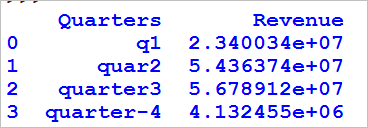
# get the length of the string of column in a dataframe

df['Quarters_length'] = df['Quarters'].apply(len)
print df
We will be using apply function to find the length of the string in the columns of the dataframe so the resultant dataframe will be

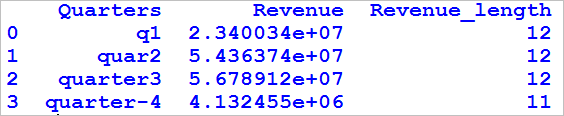
Example 2 – Get the length of the integer of column in a dataframe in pandas python:
# get the length of the integer of column in a dataframe

df[' Revenue_length'] = df['Revenue'].map(str).apply(len)
print df
- First typecast the integer column to string and then apply length function so the resultant dataframe will be